Concept preview · sample data
Construction takeoff software, built around your bid workflow
Review the plan, quantities and quote together, before the bid goes out.
We build the takeoff review tool around the way your estimators already work, then hand you an agent in Slack or Microsoft Teams. When you want a column added or a rule changed, you tell the agent and it changes the software.
A proposed build for small commercial flooring contractors. Nothing to sign up for today, and every number on this page is sample data.
- LVT-1 Luxury vinyl tileArea · 4 rooms · +10% waste · LVT 6×48 + adhesive + labor968 SF1,065 w/ waste
- CPT-1 Carpet tileArea · 4 rooms · +8% · Carpet tile 24×24 + labor840 SF907 w/ waste
- PT-1 Porcelain tileArea · 2 rooms · +12% · Tile + thinset + grout + labor256 SF287 w/ waste
- RB-1 Rubber base 4"Linear · +5% · Base + adhesive + labor612 LF
- TS-1 Transition stripCount · at 9 doors9 EA
Drawing and A-601 say LVT-1. The supplier quote still prices carpet tile.
The screen
A pages rail for the plan set, the tools, the sheet and a conditions column that carries unit, waste and the linked assembly.
The agent
Checks the drawing against the finish schedule (A-601) and the supplier quote. One card when they disagree, and otherwise a status line.
The sheet
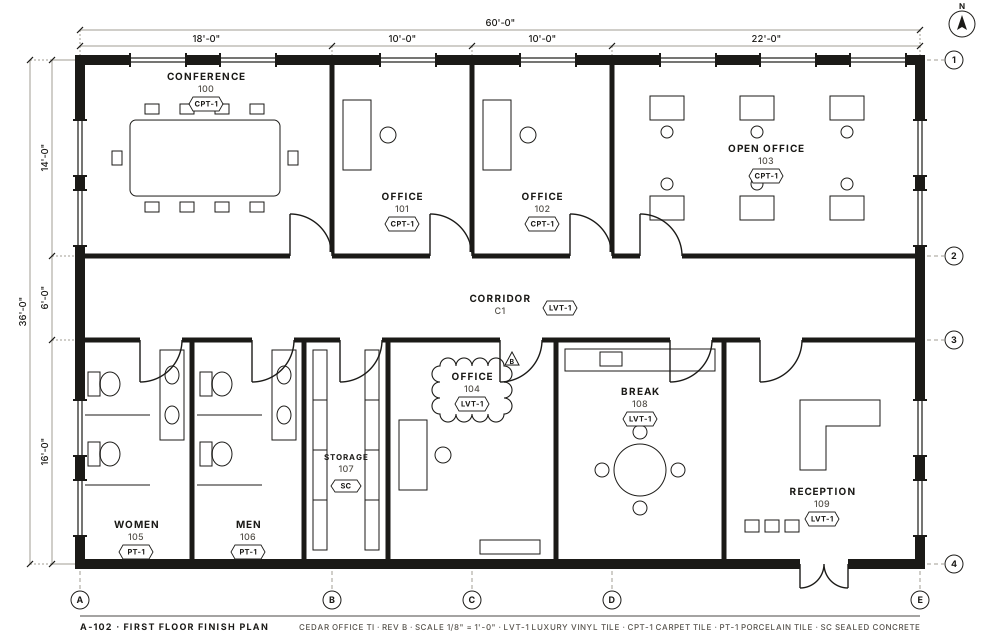
A finish plan with walls, door swings, finish tags, dimensions, grid bubbles and a Rev B cloud on Office 104.
The decision
Keep LVT-1 and flag the quote, or open both sources. A person chooses, and the export records the choice.
The sample scenario
Office 104 changed in Revision B. The quote did not.
The fictional Cedar Office job shows the one thing this software is for. Revision B switched Office 104 from carpet tile to luxury vinyl tile, and the finish schedule agrees. The supplier quote still prices carpet tile.
- Step 1The issue is flaggedOffice 104 appears once in the queue, with the Rev B cloud marked on the drawing.
- Step 2Sources side by sideClick it and the drawing, the finish schedule line and the quote line open together.
- Step 3The estimator decidesKeep LVT-1 and flag the quote, or correct the value. Either way a person chooses.
- Step 4Reviewed exportThe checked quantity sheet leaves with the decision and its source recorded.
The agent organises documents and flags suspected mismatches. Areas, lengths and counts are deterministic arithmetic that a person checks. It never infers a drawing scale, a hidden dimension or a supplier price on its own.
Keeping LVT-1 would settle the finish decision, not the cost. The carpet price would stay attached to the original quote as a mismatch, with the LVT price unresolved until the estimator supplies a corrected quote or an approved price-book entry. The proposed export would distinguish that open pricing question from the reviewed room quantity. A supplier’s price for a different material is never treated as a substitute just to complete a row.
Why custom
Construction takeoff software, built around how your office bids.
Off-the-shelf takeoff tools ask you to adopt their conditions, their assemblies and their export. This is the reverse. We start from your existing worksheet, your price book and the way your estimators mark up a sheet, and we build the review tool to match.
It is the same custom AI solutions work we do elsewhere, applied to one trade. The software is yours: the source, the documentation and the accounts it runs in.
Your conditions and waste rules
LVT, carpet tile, porcelain, base and transitions set up with the waste percentages and assemblies you already use.
Your price book, your exclusions
Prices come from the cost library you own. Measured quantities, price assumptions and exclusions sit in separate columns so nobody mistakes one for another.
Your export
The reviewed workbook lands in the format your estimate already expects, not a new one to learn.
The agent
Want the software changed? Ask the agent.
Every build comes with an agent in your Slack or Microsoft Teams. It answers questions about a bid, and it takes change requests to the software itself: a new column, a different default, an extra check. You see a preview and approve it before anything changes for the team.

 Slack or Microsoft Teams
- Estimator
Can the conditions list show waste as its own column, and default LVT to 10%?
- Splice agentApp
Drafted. The conditions panel gets a Waste column and LVT-1 defaults to 10% on new jobs. The preview is ready; nothing is live yet.
Preview ready · 2 files changed
- Estimator
Looks right. Ship it.
- Splice agentApp
Live for the Cedar Office job and every new one. Existing jobs keep their saved waste values.
In and out
What goes in, what comes out.
You supply
- The PDF plan set, specification and addenda
- Existing quantities as CSV or XLSX
- The supplier quote
- Your own price book and cost library
You get back
- A checked quantity sheet, room by room and finish by finish
- A short list of open questions, each with its source
- An estimate workbook in your existing format
Measurement stays separate from price.
Measured quantities, price assumptions and exclusions are three different things, and the workbook keeps them apart. A quantity from the drawing is never overwritten by a number from a quote. In the first pilot, the starting quantity comes from your existing takeoff export. We would map its room, finish code, unit and revision to the supporting sheet before applying your agreed waste rule. The sample’s area, linear and count controls illustrate a possible later measurement workspace; they do not mean the pilot can measure an uploaded PDF for you.
Who this fits
A good fit, and not.
A fit
- Owner-estimators and estimators at small commercial flooring contractors
- Offices that already do PDF takeoff and keep a price book in Excel
- Bids where addenda, revisions and supplier quotes get reconciled by hand
Not a fit
- Anyone who needs a complete all-trade takeoff engine on day one
- Teams that want automatic measuring from an unverified scale or hidden dimensions
- Businesses without a plan set, quantities and a quote to start from
Version one
What a first version would do, and what it would not.
In the pilot
- Import your existing flooring quantities, plans, specification and quote
- Flag finish conflicts, missing prices and an unconfirmed scale
- Export a reviewer-approved workbook
Only after that
- Measurement authoring inside the tool
- Trades beyond flooring
- Direct connections to proprietary takeoff or estimating platforms
Start with a completed bid whose decisions your estimator can explain. We would agree the room and finish naming, units, revision order, waste rules and required export columns, then review the proposed checks against that known job. Include a clean case and a disputed one so the review queue is useful in both. Before using the output on a new bid, your estimator checks the source references, corrections and open questions in the exported workbook.
The practical part
Documents, your current tools and pricing.
Documents and deletion
Plans, specifications and quotes are used for your bid and nothing else. The pilot agreement states where files live, who can see them and when they are deleted. They are not used to train a model.
Alongside your current tools
Proposed as a review layer beside Bluebeam, STACK, PlanSwift or on-screen takeoff, working from the PDF, CSV and XLSX files they already produce. It does not replace those tools and does not claim features they lack.
Pricing
To be agreed with the pilot. The likely shape is a configured setup plus an operated monthly service. Whether that runs as a subscription or per bid is still an open question.
Questions we get asked
Is this available now?
No. It is a concept for a small pilot, and this page exists so we can discuss it with flooring contractors. The screen above uses sample data.
Does the AI measure the drawing?
Not in version one. The agent reads sheets, schedules and quotes and flags where they disagree. Areas and lengths are deterministic arithmetic from quantities you supply or confirm, and a person checks them.
What happens when the supplier quote and the drawing disagree?
That is what the tool is for. The conflict shows up once, with both sources attached, and an estimator decides which one wins. The decision is recorded in the export.
What if the scale, specification or addenda are unclear?
An unconfirmed scale stays an open question; a printed scale label alone is not confirmation. The proposed review would retain the sheet and revision reference alongside the relevant specification or addendum. If those sources conflict, the estimator identifies the controlling document or seeks clarification. The agent would flag the disagreement rather than silently deciding which instruction governs the bid.
Can an estimator correct an imported quantity?
Yes, manual correction belongs in the proposed review. We would keep the original imported value beside the reviewed value, with its unit, source and reason for the change. A corrected finish should not quietly rewrite an area or a supplier price. The reviewed export would carry the chosen value and decision, while unresolved items remain visible for the person preparing the estimate.
How should we compare takeoff software options?
Start with the job you need done. If the gap is drawing measurement, evaluate a PDF measurement tool. If you need to manage a cost library and assemble the complete bid, evaluate an estimating suite. This configured review layer is proposed for the handoff between existing quantities, revised documents and supplier prices. Bring your current worksheet to the pilot discussion so we can identify a useful addition without duplicating a tool that already serves you.
Do we have to leave Bluebeam or STACK?
No. The proposed pilot works from the PDF, CSV and XLSX files those tools already produce.
Who owns the software?
You do, the same as any custom build from us: the source, the documentation and the credentials, which live in your own accounts.
How does the agent in Slack change the software?
You describe the change in plain words. The agent drafts it, shows you a preview and ships it only after you approve. It cannot change what a bid says without a person signing off.
Bring one plan set and one quote.
Thirty minutes on a real bid. You will leave knowing whether a review tool like this earns a place next to what you already use.